You’ve turned on your portable cooling unit, but instead of a refreshing breeze, you’re met with warm air. Frustrating, right? You’re not alone—nearly 30% of cooling issues stem from simple fixes like dirty filters or incorrect settings. This guide is here to help you pinpoint the problem and get your unit back to blowing cold air efficiently.
From checking airflow to resetting the system, we’ll walk you through actionable steps to solve common issues. Whether it’s a clogged filter or a remote control glitch, you’ll find solutions that don’t require a technician. Ready to dive in? Let’s get your cooling system back on track.
Key Takeaways
- Dirty filters can block airflow, reducing cooling efficiency.
- Incorrect thermostat settings may prevent your unit from cooling properly.
- Regular maintenance can prevent common issues like freezing or overheating.
- Resetting the system often resolves minor operational glitches.
- Consulting a technician is recommended for complex problems like capacitor failure.
Understanding Common Cooling Issues
When your cooling system starts blowing warm air, it’s easy to feel frustrated and unsure of what’s wrong. The good news is that many cooling problems have simple explanations. By identifying the symptoms early, you can often resolve the issue without calling a technician.
Identifying Symptoms and Poor Airflow
One of the first signs of trouble is weak or uneven airflow. If the air feels less powerful than usual, it could indicate a blockage or restriction. You might also notice a dusty smell, which often points to a clogged filter. These symptoms are common and usually easy to fix.
Poor air circulation can also stem from obstructions around the unit. Make sure nothing is blocking the vents or intake areas. Even a small obstruction can reduce efficiency and prevent the system from cooling properly.
Recognizing the Impact of Dirty Filters and Compressor Issues
Dirty filters are a leading cause of cooling problems. Over time, dust and debris build up, restricting airflow and forcing the unit to work harder. This not only reduces cooling performance but can also lead to higher energy bills.
Compressor issues are another common culprit. If the compressor isn’t functioning correctly, the system may struggle to cool the air. Regular maintenance checks can help catch these problems early, saving you time and money in the long run.
By staying alert to these symptoms, you can address cooling issues before they escalate. In the next section, we’ll explore step-by-step solutions to get your system back on track.
toshiba ac troubleshooting guide: Step-by-Step Solutions
Feeling the heat despite your cooling unit being on? Here’s how to troubleshoot effectively. Start with the basics and work your way through the system to identify and fix the problem. These steps are designed to save you time and effort.
Checking Remote Control, Power Supply, and Settings
First, ensure your remote control is working. Dead batteries or misalignment with the sensor can cause issues. Replace the batteries if needed and check the distance—most remotes work within 24 feet of the unit.
Next, verify the power supply. Make sure the unit is plugged in securely and the outlet is functioning. A stable power connection is essential for optimal performance.
Finally, double-check the settings. Ensure the cooling mode is selected and the temperature is set correctly. Incorrect settings can prevent the system from cooling effectively.
Reset Procedures and Cleaning Techniques
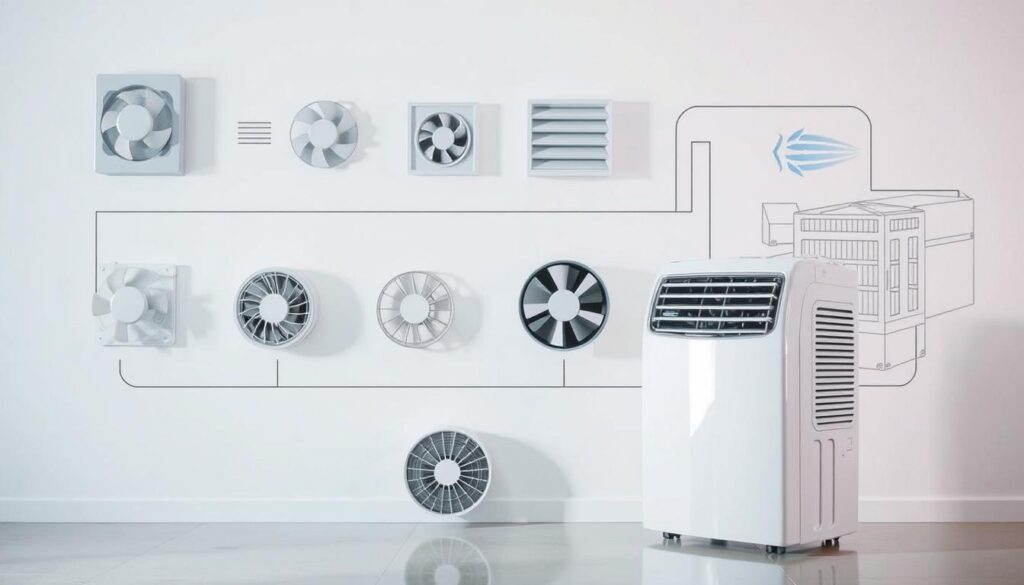
If basic checks don’t resolve the issue, try resetting the system. Locate the reset button inside the access panel and press it for a few seconds. This can restart the unit and clear minor glitches.
For optimal performance, clean the filters regularly. Dirty filters can reduce efficiency by up to 15%. Wash or replace them every two weeks to maintain airflow and cooling power.
| Step | Action | Outcome |
|---|---|---|
| 1 | Check remote control batteries | Ensures proper communication with the unit |
| 2 | Verify power supply | Confirms stable operation |
| 3 | Reset the system | Clears minor glitches |
| 4 | Clean or replace filters | Improves airflow and efficiency |
If these steps don’t solve the problem, it might be time to call a technician. Complex issues like compressor failure or refrigerant leaks often require professional service. Regular maintenance can prevent up to 80% of unexpected breakdowns, so keep your unit in top shape.
When to Reach Out to a Professional Air Conditioning Technician
Sometimes, even after trying all the DIY fixes, your cooling system still doesn’t work as it should. That’s when it’s time to call in a professional. Knowing when to seek expert help can save you time, money, and frustration.
The Importance of Professional Service and Industry Standards
Professional technicians bring expertise and tools that go beyond what most homeowners can do. They follow strict industry standards to ensure your system runs safely and efficiently. Regular maintenance by a qualified technician can prevent up to 80% of unexpected breakdowns.
For example, issues like refrigerant leaks or compressor failures often require specialized knowledge. A certified technician can diagnose and fix these problems quickly, restoring your comfort without guesswork.

Understanding Service Policies, Privacy, and Customer Support Questions
When hiring a technician, it’s important to understand their service policies. Reputable professionals will explain their process, costs, and guarantees upfront. They also follow strict privacy guidelines to protect your personal information.
If you have questions, don’t hesitate to ask. A good technician will provide clear answers and ensure you feel confident about the service being performed.
Using Data and Research to Decide on Expert Help
Data shows that professional intervention significantly improves troubleshooting success. For instance, short cycling—when your unit turns off too quickly—can increase energy costs by up to 30%. A technician can identify the root cause and fix it efficiently.
Research also highlights the benefits of regular maintenance. Systems serviced by professionals last longer and perform better, saving you money in the long run.
If you’re unsure whether to call a technician, consider the complexity of the issue. Simple fixes like cleaning filters or resetting the system can often be done yourself. But for more serious problems, professional help is the best choice.
Wrapping Up: Key Actions and Insights
Keeping your cooling system in top shape doesn’t have to be overwhelming. By following the steps outlined in this guide, you can address common issues like poor airflow or incorrect settings. Regular maintenance, such as cleaning filters and checking the remote control, ensures your unit runs efficiently.
Proactive care not only extends the life of your system but also saves energy and costs. However, if problems persist, don’t hesitate to contact a professional technician. They can handle complex issues like refrigerant leaks or compressor failures, ensuring your air conditioning system operates safely.
Finally, always review service policies and prioritize privacy when seeking help. If you have any questions, reach out to trusted customer support for guidance. Share this guide with others to help them stay cool and confident in maintaining their systems.
FAQ
Why is my portable air conditioning unit not cooling properly?
How do I check if my air conditioning settings are correct?
What should I do if resetting my air conditioning unit doesn’t work?
How often should I clean my air conditioning filters?
When should I call a professional air conditioning technician?
What privacy policies apply when I contact customer support for my air conditioning unit?
How can I ensure my air conditioning unit meets industry standards?
Source Links
- Portable AC Compressor Not Turning On? Try This Troubleshooting Guide
- 16 Reasons Your AC Is Not Turning On & How to Fix Them
- Air Conditioner issues and causes | AHI Toshiba Air Conditioners
- 16 Reasons Your AC Is Not Turning On & How to Fix Them
- Toshiba Air Conditioner Troubleshooting: Tips and Tricks | Cyber Air Conditioning
- Toshiba Split Ac, Inverter Ac, Inverter Split Ac, Toshiba Inverter Ac
- How to Check Refrigerant Level in AC
- Why Your Air Conditioner Turns Off After About 15 Minutes
- Heat Pump Not Working? | Heat Pump Troubleshooting
- SERVICE MANUAL – Toshiba
- Toshiba Satellite M35X A75 power jack problem


0 Comments